fb popoup

Receive all updates via Facebook. Just Click the Like Button Below

Run Android Apps on PC - Android Emulator by BlueStacks

Yes you heard right, now you can run any Android apps on PC using the great Android emulator made by BlueStacks known as "BlueStacks App Player".

The New Nokia Store - (Improved OVI Store) - Symbian^3 - Anna - Belle

As part of the tough competition from Android store and The Iphone app store, Nokia is trying their level best to improve their position by the release of this New Online App Store client called Nokia Store.

What is Dropbox? Get Dropbox Android, iOS and Symbian

To understand what is Dropbox, you must have to know a little about cloud storage.With cloud storage you can easily share and synchronize your documents and files across the internet.That means you can access your files from any computers or other devices which support a cloud client software.

Cluzee and Vlingo - iPhone Siri Alternative for Android and Symbian

So far we have discussed about the features of Siri. Now lets come to the point, is there a Siri alternative for Android? Let me declare the fact that, there is no official Siri alternative for Android available yet!. For the time being, what we can do is to find the most appropriate app which look alike Siri.

Motorola MT917 - 13MP Moto droid 2.3 - Features, Specification and Price

The new Motorola MT917, a 4.5 inch android with 13MP camera, is launched in this Christmas. Motorola MT917 is packed with android 2.3 gingerbread which can be later upgraded to Ice Cream Sandwich. The 13MP auto focus camera unit which can capture 1080p video, a dual core 1.2GHz processor and the large 4.5 inch Super AMOLED Advanced Capacitive touch screen with a resolution

Showing posts with label Android. Show all posts

Thursday, December 15, 2011

WiFi Tethering - Turn your phone into WiFi Hotspot [Android-iOS-Symbian]

What is WiFi ?
WiFi (Wireless Fidelity) is a technology which allow connecting electronics devices such as PC, Smart Phone, Tablets etc wirelessly within a specific range.The most common use of WiFi is to connect WiFi enabled devices to internet via WiFi Hotspot(Access point).That means a WiFi enabled devices such as a laptop or a smartphone can connect to internet, if it is within the range of a WiFi hotspot.
To be more specific about Smartphones, most of the modern mobile phones comes with inbuilt WiFi unit. Such phones can connect to internet without the need of any mobile carrier, for example from a public WiFi hotspot in the airport or shopping mall.The WiFi unit in a smartphone will do the two most basic functions, one of which is  receiving WiFi signals and the other, transmitting a WiFi signal.

What is WiFi Tethering or How to turn your phone into portable WiFi Hotspot?
As we said earlier, a smartphone can both transmit and receive WiFi signals.If we can get connect to internet via another WiFi device (hotspot), logically the converse should also be possible.
Yes it is possible, your phone can serve as a WiFi hotspot, which provide high speed internet to the devices surrounds it, and is portable too, because of its mobility.Once you setup WiFi hotspot on your phone, all other devices including Laptops, PC, Tablets and other Smartphones can connect to internet through it. 
All you need is a 2G, 3G or a 4G mobile data plan, and a WiFi tether enabled smartphone.
WiFi tethering is possible in almost all platforms such as Android, iOS, and Symbian, with a few modifications in its network settings.Below is the description of tethering settings of each platform.
Remember, if you turned on WiFi tethering in a public place, every people including strangers will have access to your phones hotspot. I suggest you to password protect your hotspot (this option is available in "Advanced Settings"), so that no strangers can access your hotspot.

1. WiFi Tether for Android
Android devices with WiFi, can enable WiFi tethering very easily.But it should be noted that in some android devices the Network (such as AT&T) may hide tethering settings, in such phones you may need to root your android to re-enable them. The new Samsung galaxy S2 is a good example, since some of it doesn't support tethering until you root it. So i suggest you to root your phone (only if it is legal in your region) first if the settings described just below is not visible.

Steps to Enable WiFi Tether for Android (Taking Android 2.3 as example):
  1. Go to the "Settings" from menu
  2. Choose "Wireless and Networks" -> "Tethering and Portable hotspot"
  3. Two Options will appear - "USB Tethering" and "Portable Wi-Fi Hotspot Settings", from which we select the second one.
  4. Press "OK".Then check "Portable Wi-Fi Hotspot". Change the Configuration settings if you like so. 
  5. That's all.Now your android is a portable WiFi hotspot
2. WiFi Tethering in iOS
iOS is Apples's operating system which is used in Apple products such as iPhone, iPad, iPod etc.
Beginning from iOS 4.3, it officially support WiFi tethering. It is as simple as we enable it in android.
Steps to Enable WiFi Tether for iOS
  1. Open "Settings" from menu.
  2. Go to "General"->"Network"->"Personal Hotspot" and switch it on.
  3. Now you can connect any other devices to your hotspot.The default password for connection is abcdefgh
3. In Symbian
Unfortunately there is no official support for WiFi tethering in Symbian yet. So you need to install third party apps to enable WiFi tethering.
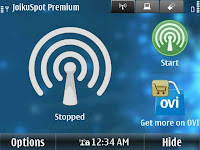
Joikuspot is one such application which make it possible.A light version of Joikuspot called Joikuspot Light is available free for download on Nokia store.
A premium version which can create secure hotspots with vpn support is also available there.
It is easy to create hotspots with Joikuspot, Just open Joikuspot application, select a working access point and connect!

Monday, December 5, 2011

Cluzee & Vlingo - iPhone Siri Alternative for Android & Symbian

What is iPhone Siri?
Siri is an innovative application offered by apple iPhone (beginning  from iPhone 4S), which lets your phone to do things, by simply telling what to do. If you need to send a text to your friend, just tell it to Siri, it will automatically convert your voice to text and will send it.Siri uses most of the built in apps and let you operate them by voice.You can Search internet, Schedule meetings, Search for location,Directions, Traffic and much more things can be done by using your voice.The most surprising feature of iPhone Siri is that we can talk to it as simple as we would to a person.It not only understand "what you say", but also "what you mean".
Just tell Siri to "Wake me up at 7.00" or "Wake me in 7hrs",  Siri will set the alarm for you.
Tell siri to "Find pizza" it will list all pizza places around you, and will suggest the most appropriate one, based on your location and time.
In short Siri is an intelligent partner who understand what you need, what you mean, and do it at the right time.


Cluzee - Siri alternative for Android

So far we have discussed about the features of Siri. Now lets come to the point, is there a Siri alternative for Android? Let me declare the fact that, there is no official Siri alternative for Android available yet!.
For the time being, what we can do is to find the most appropriate app which look alike Siri. Being the most popular mobile operating system with billions of apps downloads in each month, there should be at least one app which satisfy your quest.Yes it is the "Cluzee". Cluzee is the latest android app to fulfill the voice control gap in Android.You may download it for free from the android market. Its clear that Cluzee is not as god as Siri. Because the 'intelligence part' will not work as good as it works in Siri.
What Cluzee have is a list of  pre-written commands which it can understand.We have to talk to Cluzee according to the pre-defined format of commands.Though we can do many things with Cluzee such as sending text, reading mail, notes management, personalized deal reports, to track your diet etc.
As a third party app, Cluzee will find it difficult to interact with the Calender and Contacts apps on the phone, though i am sure it will get better over time.So i suggest you, never leave your android simply because of Siri!

Vlingo for Symbian
The Vlingo app is available for most of the operating systems including iOS, Android, Blackberry & Symbian.Though why i place it under Symbian is because, the latest Anna & Belle updates from Nokia has the Vlingo app pre-installed. Just like Cluzee, Vlingo also can understand a set of pre-defined commands.Sending text, reading mail, update social networks, find businesses etc are also possible with Vlingo.You may download Vlingo from their official site.

Tuesday, November 1, 2011

4 Best Android Music Player - Free + Paid

For newbies, it will be somewhat difficult to find out the Best Android Music Player which can play music on Android with utmost quality.So let me do that task for you.Here i have listed the 4 best Android music player according to the user reviews and other sources.Most of them are free and few needs you to pay money.

1.PowerAMP for Android


PowerAmp is one of the 4 Best Android music player.It is a powerful android music player which can play most of the music formats with a 10 band graphical equalizer.You can adjust the bass and treble, add crossfade   and do a lot more.With an intuitive design and great options for advanced users, PowerAMP is probably one of the best android music player available.
You may download a full functional  15 day trial version of  PowerAMP 1.4 from here
If you like to own it for lifetime, purchase it from here.

2.Winamp for Android


The best music player for PC, the Winamp  is also one of the best in android music players.Being developed by the official developer, the Nullsoft, Winamp gives the same functionality as it where in the windows.You can play, manage and sync music files from the PC to your Android device.Winamp also features radio podcast from SHOUTcast.You can also play any streaming audio URL on android, using the winamp Pro for android.
Just as in PC, winamp do have two versions, one lite and free version for basic users and another paid Pro version for advanced users.
You may download generic free version from here: Winamp 1.2 for Android

3.PlayerPro for Adroid


PlayerPro is yet another advanced music player for android devices which can play video files too.You may change the user interface of PlayerPro by installing one of the 14 free skins available.PlayerPro also features 10 band graphic EQUALIZER with 15 default/customizable presets.
Dolby and SRS sound effects are available for HTC devices equipped with HTC sound enhancement(HTC desire HD, etc)
You may download the free 7 days trial version of PlayerPro from here: PlayerPro 2.12
Full version can be purchased from here: PlayerPro 2.12

4.Audiogalaxy for Android


Audiogalaxy for Android is a completely free and powerful music player for android.Audiogalaxy is very easy to install without need to setup router/firewall configuration.Home screen and Lock screen widgets are also available in this free android music player.
The latest version can be downloaded from here: Audiogalaxy for Android

So that's all my suggestions for Best 4 Android Music Player s.
If you find any other app, better than this, please mention here, so that i can add it to my list.

Friday, October 14, 2011

Run Android Apps on PC - Android Emulator by BlueStacks

If you are an Android freak, you might have tired of  searching for Android Emulator which can Run Android apps on PC.You might have searched a lot to get a working Android emulator to run android apps on Windows, and i'm pretty sure, you end up with nothing!
But from Tuesday on wards  the total scenario is changed drastically! Yes you heard right, now you can run any Android apps on PC using the great Android emulator made by BlueStacks known as 
"BlueStacks App Player".The BlueStack Apps Player is a free piece of software which can run your favorite android applications on any Windows PC.The application features a new type of virtualization by which we can run any app full screen on desktop.The virtualization contains 10 pre-loaded android apps which can be run straight out of the box.This android emulator is developed by 10 engineers from BlueStacks, taking two years of time to complete.“We use a very complex proprietary virtualization technology that took two years to build to make this happen,” said John Gargiulo, BlueStacks’ VP of Marketing, in an email to WinRumors.
The BlueStacks app player is build in a way such that it can run any graphics intensive apps like Asphalt, Angry Birds etc.The BlueStacks Android Player can also be integrated with the BluesStcks cloud connect client for android.This client which work from your mobile will allow us to push our favorite android apps from our phone into Blustcks App Player via the cloud technology.The app player is nothing but a Gadget which can be placed on our windows 7 desktop, and will list all android apps in our account with an option to download additional apps from the internet, and can Run android apps on PC with just one click.

The pre-loaded apps includes Bloomberg, Drag Racing, Bubble Buster, LivingSocial, Huffington Post and Creative Mobile.Being an alpha release the company hopes to attract more developers in future.And also android developers will see this as an opportunity to get their android apps into a millions of windows devices.
The alpha version of this great android emulator, which made the dream "Run android apps on PC" a reality, is only available for windows for now.But as notified by the official site the company is likely to release a Mac version of BlueStacks android player in near future.That is users should wait a little long to run android apps on Mac.“The openness of Android is enabling innovation around the world. We are grateful to Google and others for their contributions. This is also a social equalizer in the US and countries like Brazil, India and China, where a large percentage of the population who can only afford smartphones can now enjoy and benefit from the ubiquity of apps on the Android platform,” said Rosen Sharma, President and CEO of BlueStacks.

You may download BlueStacks App Player from their official site: http://www.bluestacks.com/download.html

Demo video-BlueStack Apps Player-Run android apps on PC

Facebook

Share

Twitter Delicious Facebook Digg Stumbleupon Favorites More