


 What is WiFi ?
WiFi (Wireless Fidelity) is a technology which allow connecting electronics devices such as PC, Smart Phone, Tablets etc wirelessly within a specific range.The most common use of WiFi is to connect WiFi enabled devices to internet via WiFi Hotspot(Access point).That means a WiFi enabled devices such as a laptop or a smartphone can connect to internet, if it is within the range of a WiFi hotspot.
To be more specific about Smartphones, most of the modern mobile phones comes with inbuilt WiFi unit. Such phones can connect to internet without the need of any mobile carrier, for example from a public WiFi hotspot in the airport or shopping mall.The WiFi unit in a smartphone will do the two most basic functions, one of which is receiving WiFi signals and the other, transmitting a WiFi signal.
What is WiFi Tethering or How to turn your phone into portable WiFi Hotspot?

Yes it is possible, your phone can serve as a WiFi hotspot, which provide high speed internet to the devices surrounds it, and is portable too, because of its mobility.Once you setup WiFi hotspot on your phone, all other devices including Laptops, PC, Tablets and other Smartphones can connect to internet through it.
All you need is a 2G, 3G or a 4G mobile data plan, and a WiFi tether enabled smartphone.
WiFi tethering is possible in almost all platforms such as Android, iOS, and Symbian, with a few modifications in its network settings.Below is the description of tethering settings of each platform.
Remember, if you turned on WiFi tethering in a public place, every people including strangers will have access to your phones hotspot. I suggest you to password protect your hotspot (this option is available in "Advanced Settings"), so that no strangers can access your hotspot.
Remember, if you turned on WiFi tethering in a public place, every people including strangers will have access to your phones hotspot. I suggest you to password protect your hotspot (this option is available in "Advanced Settings"), so that no strangers can access your hotspot.
 Android devices with WiFi, can enable WiFi tethering very easily.But it should be noted that in some android devices the Network (such as AT&T) may hide tethering settings, in such phones you may need to root your android to re-enable them. The new Samsung galaxy S2 is a good example, since some of it doesn't support tethering until you root it. So i suggest you to root your phone (only if it is legal in your region) first if the settings described just below is not visible.
Steps to Enable WiFi Tether for Android (Taking Android 2.3 as example):
- Go to the "Settings" from menu
- Choose "Wireless and Networks" -> "Tethering and Portable hotspot"
- Two Options will appear - "USB Tethering" and "Portable Wi-Fi Hotspot Settings", from which we select the second one.
- Press "OK".Then check "Portable Wi-Fi Hotspot". Change the Configuration settings if you like so.
- That's all.Now your android is a portable WiFi hotspot!
 2. WiFi Tethering in iOS
iOS is Apples's operating system which is used in Apple products such as iPhone, iPad, iPod etc.
Beginning from iOS 4.3, it officially support WiFi tethering. It is as simple as we enable it in android.
Steps to Enable WiFi Tether for iOS
 Unfortunately there is no official support for WiFi tethering in Symbian yet. So you need to install third party apps to enable WiFi tethering.
Beginning from iOS 4.3, it officially support WiFi tethering. It is as simple as we enable it in android.
Steps to Enable WiFi Tether for iOS
- Open "Settings" from menu.
- Go to "General"->"Network"->"Personal Hotspot" and switch it on.
- Now you can connect any other devices to your hotspot.The default password for connection is abcdefgh
3. In Symbian
 Unfortunately there is no official support for WiFi tethering in Symbian yet. So you need to install third party apps to enable WiFi tethering.
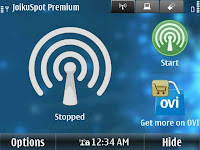
Joikuspot is one such application which make it possible.A light version of Joikuspot called Joikuspot Light is available free for download on Nokia store.
A premium version which can create secure hotspots with vpn support is also available there.
It is easy to create hotspots with Joikuspot, Just open Joikuspot application, select a working access point and connect!
A premium version which can create secure hotspots with vpn support is also available there.
It is easy to create hotspots with Joikuspot, Just open Joikuspot application, select a working access point and connect!


